AI coding agents: clearer checks, easier review
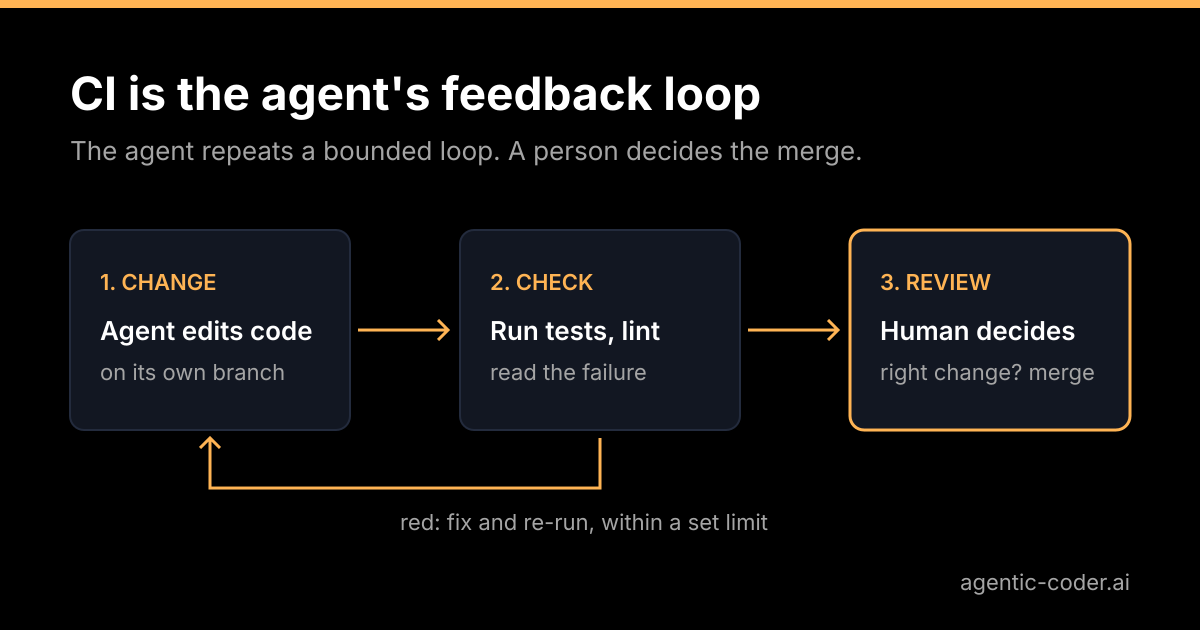
Suppose you ask an AI coding agent for a small fix and receive a plausible pull request. Before reviewing it, you want to know what was checked and what still needs your judgement. A failed import should be caught by a runnable check; whether the change solves your problem remains your decision. Give the agent clear feedback so its handoff contains evidence you can assess.
Why the agent needs something to run
A person who changes code usually runs the tests, reads the output and adjusts. An agent can do the same, but only if the repository gives it something to run. Without checks, the agent has no way to tell a working change from a confident guess, and you become the test suite.
With checks, the loop is simple: change the code, run the checks, read the result, try again. Each pass takes time and compute, so the loop should have a limit. Some mistakes can be caught before the pull request reaches you, which leaves more of your attention for the question only you can answer: is this the right change?
What makes a good loop
Think of the checks as a conversation between the repository and the agent. A conversation works when answers come quickly and mean the same thing every time.
Fast
The agent may run your checks several times for one issue. As a hypothetical example, if the full suite took twenty minutes, either the agent would wait or it would skip the run. Consider giving it a quick local subset: a type check, a linter, and the tests for the area it touched. The full suite stays mandatory in CI, and the quick subset does not replace it.
Deterministic
A test that sometimes fails for no reason is a trap. Either a person or an agent can mistake the failure for a real regression and rewrite correct code to make it go away. A re-run that happens to pass is not a fix either, because it hides the nondeterminism. Investigate the cause, and before you rely on an agent, fix flaky tests or quarantine them with a clear label.
The same locally and in CI
If the checks pass on the agent's machine and fail in CI because the two run different commands, the loop lies. Put the checks behind one command, for example npm test or make check, and have CI call that same command. This helps, but parity is never complete. Differences in operating system, runtime version, installed dependencies, environment variables, available services and flaky tests can all make a local run and a CI run disagree. Treat a green local run as a good sign, not a promise, and let CI have the final word.
Write failures the agent can act on
The agent reads output the way you do, only more literally. Compare two failures:
FAIL  invoice.test.js
  expected true, received false
FAIL invoice.test.js
total() should round to 2 decimals
expected 10.01, received 10.005The second one tells the agent what the code should do. A descriptive test name and a specific assertion message turn your suite into instructions. This is also good practice for people, so the effort pays twice.
Guard against the shortcut
An agent that is told to make the checks pass has an easy way out: change the check. It may not, but it is worth knowing the failure mode. Possible signs include:
- a test that was deleted or skipped in the same pull request as the fix;
- an assertion that was loosened, for example an exact value replaced by "not null";
- a lint rule that was disabled for one file;
- a coverage threshold that was lowered.
When reviewing an agent pull request, it makes sense to look at changes to tests and check configuration first. New tests for new behaviour are good. Edits to existing tests deserve a reason in the description. Branch protection with required status checks helps here, because the checks must pass before anything merges, and you decide which checks are required. You can read how that works in the GitHub documentation on protected branches.
Where agentic-coder fits
An issue becomes a pull request for you to review. With agentic-coder, you label a GitHub issue agent; it classifies the issue, writes a plan, implements the change and runs the checks before opening the pull request. Nothing merges without human review. The useful handoff is the plan, the diff and the check results, with the limits of those checks made clear. See that handoff on the demo page.
What green does not tell you
A green run says the change passes the tests you wrote. It does not say the change matches what you wanted, fits the architecture, or covers a case nobody tested. An agent can solve the wrong problem and pass every check, because the checks only cover what someone thought to cover.
That is why the loop ends with a person. The agent iterates within a limit, and then you read the plan, the diff and the description. If you want the longer argument, read our piece on why human review stays the merge gate.
Before handing over your next issue, choose one check you already trust for the area being changed. Run it locally, confirm that CI runs the same check and write down what a passing result does not cover. You can do that with your current tools; you do not need to adopt a new product to start.
Conclusion
An AI coding agent works best when your repository can tell it quickly and clearly whether a change is correct. Keep the checks fast and deterministic, run them the same way locally and in CI as far as you can, and write failures that read like instructions. Watch for edits to tests, and protect the branch with required checks. Then let the agent do the iterating, and keep the final decision for yourself.
Frequently asked questions
What if my repository has few or no tests?
Start small. A build step, a type check or a linter already gives the agent something to run. Add a test for the area you want the agent to change before you hand it an issue there.
Should the agent be allowed to edit the tests?
New tests for new behaviour are welcome. Changing or deleting an existing test to get a green result is a red flag, so look at test changes first when you review.
How can flaky tests mislead an agent?
A person or an agent can mistake a flaky failure for a real regression and change correct code to chase it. Re-running until the result turns green hides the problem rather than fixing it. Investigate the nondeterminism, then fix or quarantine the flaky test before you rely on an agent.
Does a green CI run mean I can merge?
No. It means the change passes the checks you wrote. Whether it solves the right problem and fits the codebase is still a human decision.